
Most advice about a feed reader Firefox setup starts with the extension list. That's backwards. The right choice depends on whether you want browser-local storage, synchronized access across devices, aggressive filtering, bookmark-style browsing, or a reader you can own and maintain yourself. The practical comparison is setup friction, feed discovery, full-text handling, refresh behavior, privacy, exportability, and how much maintenance you're willing to carry.
Read More Info gives a useful test case for any feed reader Firefox workflow because it exposes both a site feed and a comments feed, so you can compare article updates and discussion updates side by side. Test with the main Read More Info feed and the comments feed. If you want a quick broader benchmark for reader selection, the smart RSS reader picks roundup can help frame the trade-offs before you install anything.
Table of Contents
- 1. Feedbro
- 2. Feeder
- 3. Smart RSS Reader
- 4. Livemarks
- 5. Inoreader
- 6. Feedly
- 7. NewsBlur
- 8. BazQux Reader
- 9. Miniflux
- 10. FreshRSS
- Top 10 Firefox Feed Readers, Feature Comparison
- Choose the Reader You Will Actually Maintain
1. Feedbro
Feedbro is the strongest choice if you want a full reader living inside Firefox instead of a separate service. Its page detection, standalone RSS, Atom, and RDF handling, plus a rule engine for filtering, tagging, and notifications, make it feel closer to a local workflow hub than a simple subscription list. The trade-off is obvious, your data follows the browser profile, not a cloud account.

Feedbro's built-in full-text conversion matters when feeds are truncated. If a publisher only exposes summaries, the extension can often reconstruct enough readable content to keep you from jumping back to the site. That's useful in real reading sessions because it keeps the workflow inside Firefox, especially when you're skimming many sources at once.
Practical rule: choose Feedbro when you care more about control than portability. Export and backups become part of the job, because the data is local and tied to the Firefox profile.
Why it works well
- No separate account: you can subscribe and read without signing into another service.
- Offline-friendly after fetch: once articles are pulled in, you can keep reading without depending on a live connection.
- Useful for power users: the filtering and notification rules are far more capable than the average browser add-on.
Where it falls short
- Profile dependence: if you move browsers or profiles, you need to manage exports.
- Update delays can happen: add-ons still live under store review cycles, so fixes and improvements don't always land instantly.
For teams or solo readers who like local ownership and don't mind a bit of housekeeping, Feedbro is one of the clearest fits. The Read More Info blog is a good place to test how it handles a normal WordPress feed and a comment stream in the same browser.
2. Feeder
Feeder is the polished option when the feed reader Firefox experience needs to sync cleanly across devices. The browser extension is only part of the product, because the true value is in the web and mobile apps that keep unread items, dashboards, and notifications aligned. That matters if you switch from desktop reading to phone reading without wanting to reconfigure everything.
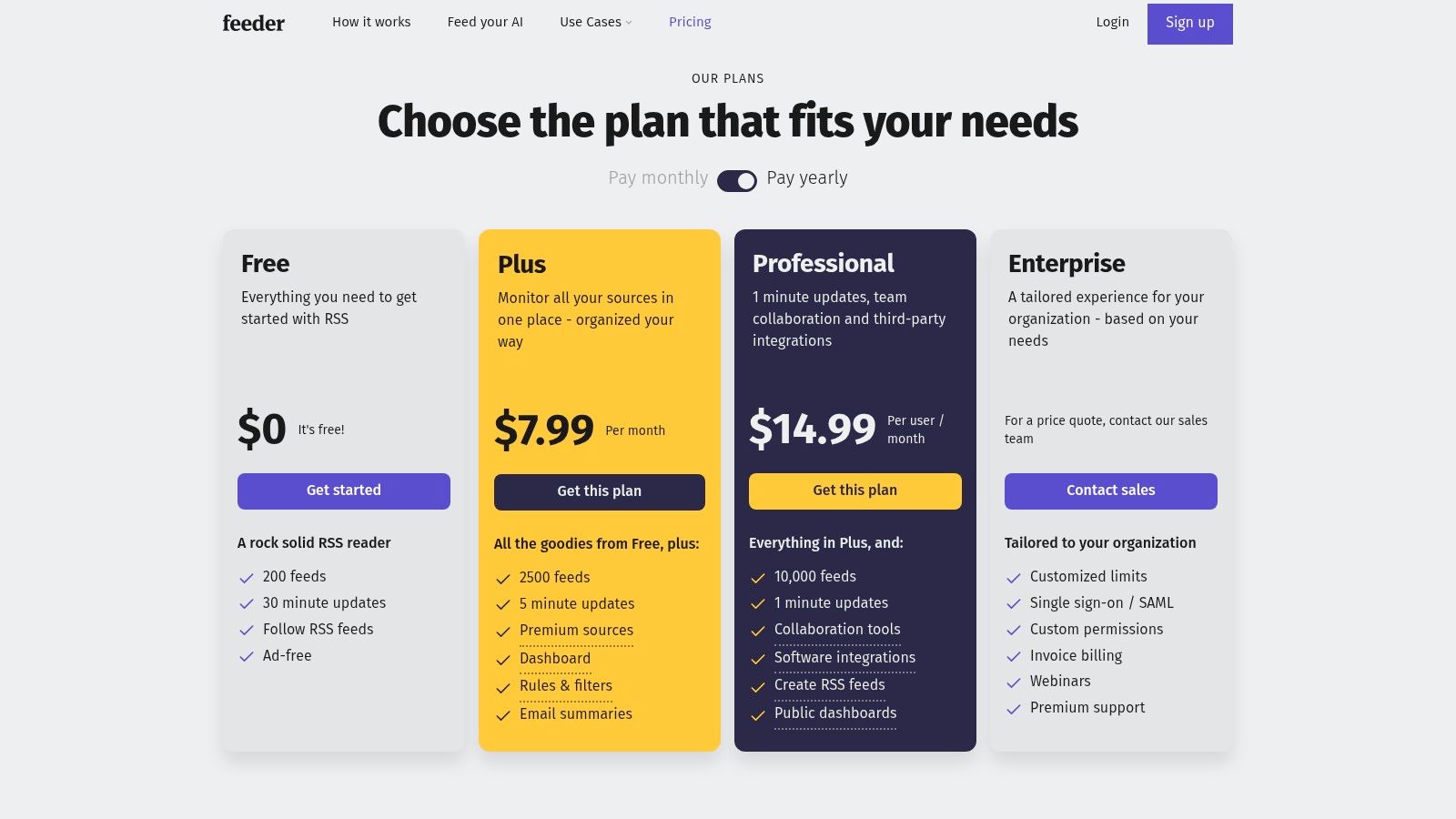
The platform's plan structure is a major decision factor. Feeder publishes a clear pricing grid, and the free plan has limits on feed count and update speed, while faster polling and heavier usage sit on paid tiers. That makes it easier to evaluate than vague freemium products, but it also means the free experience is intentionally bounded.
A better way to think about Feeder is as a synchronized reading system, not just a Firefox add-on. You get unread counters, quick-post lists, rules, and email summaries, which is useful if you treat feeds as a daily queue instead of an archive you occasionally browse. For people who rely on regular checks rather than deep local curation, that workflow is smooth.
Best fit
- Cross-device readers: if you expect the same subscriptions on desktop and mobile.
- Notification-driven monitoring: if feed updates need to reach you outside the browser.
- Users who want transparency: the feature grid makes plan boundaries easy to understand.
Less ideal
- Free-tier constraints: capped feed counts and slower refresh can get in the way as your list grows.
- Less ownership than local tools: your reading experience lives inside a service rather than your own browser data.
If your priority is convenience and sync, Feeder is easier to live with than a local-only extension. If your priority is data custody, it's not the first pick.
3. Smart RSS Reader
Smart RSS Reader is the minimalist answer for people who want a lightweight feed reader Firefox setup without a cloud layer. It runs in a single tab, keeps the interface simple, and leans on local storage with OPML import and export. That makes it feel closer to a quiet utility than a platform.
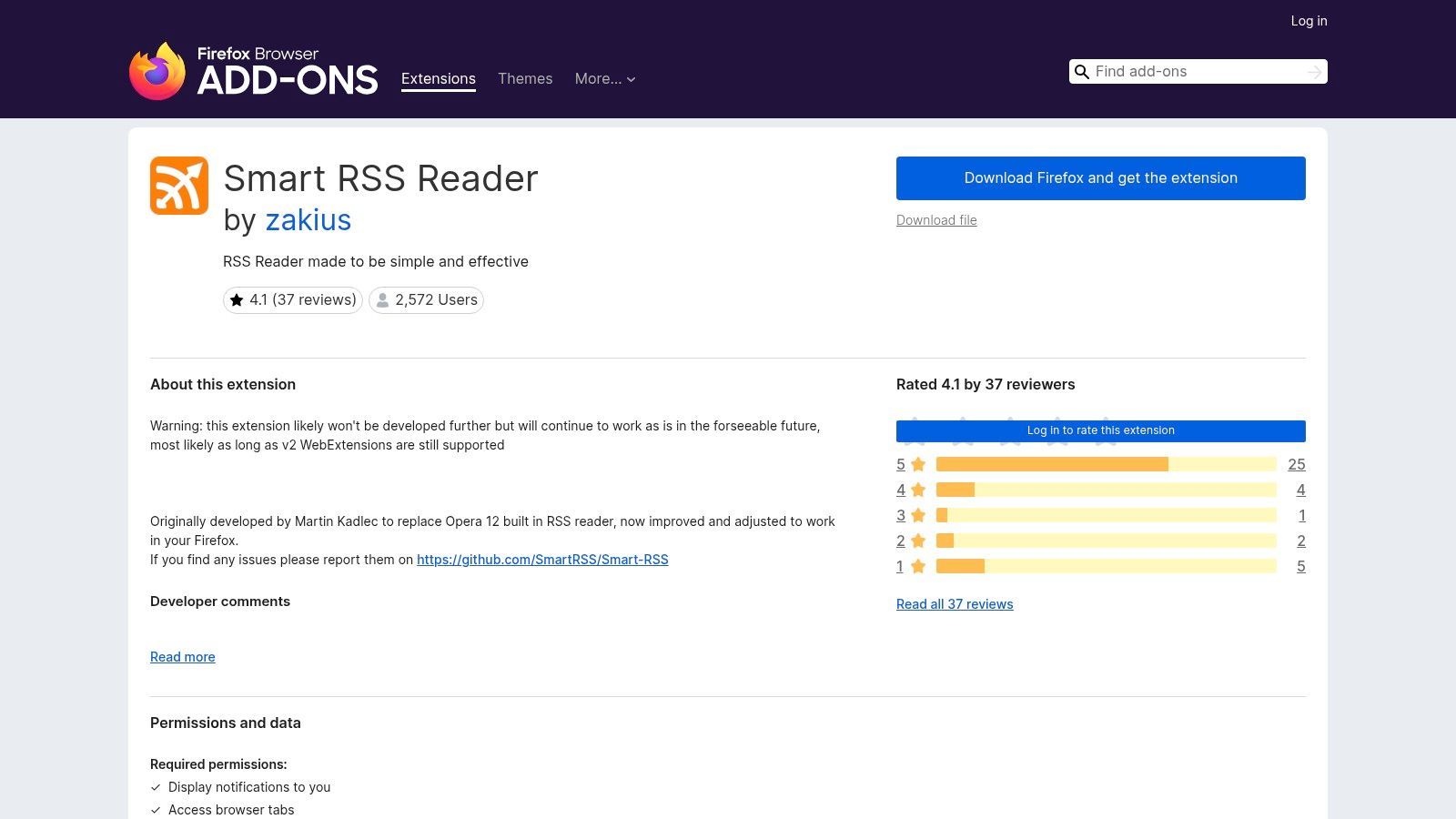
The main advantage is speed through restraint. You open it, load feeds, and read. There's no heavy dashboard to learn, and that simplicity matters when you only want a local inbox for articles and don't need automation, sharing layers, or a team workspace.
It's the kind of reader that works best when you want the browser to stay a browser.
There's a real ownership angle here too. Because it stores feeds locally and supports OPML, you can move subscriptions in and out without building your workflow around a vendor account. That's attractive for readers who like to keep things portable but don't want to run a server.
Good reasons to use it
- Simple local use: low friction and easy to understand.
- No account required: fewer moving parts and fewer privacy trade-offs.
- OPML support: subscription portability stays practical.
Main limitations
- No cloud sync out of the box: device-to-device continuity is up to you.
- Limited future development flags: that means you should treat it as a simple utility, not a long-term platform bet.
If you want the least complicated Firefox-native reader that still respects exportability, Smart RSS Reader is a smart stop. It also fits the standard blog syndication workflow cleanly, which makes it easy to test against ordinary WordPress feeds before committing to something bigger. For a basic publishing reference point, see this guide to blog syndication.
4. Livemarks
Livemarks is for people who never really liked dedicated readers in the first place. It restores the old bookmark-folder style of feed reading, so subscriptions appear where Firefox users already expect to find site collections. That makes it less of a new app and more of a familiar browsing pattern.

This model has a real advantage when your feeds are mostly a handful of sites you check often. You don't need a separate reading pane, a tagging system, or a notification engine if you mainly want bookmark-style folders that update. It also works naturally with any site that exposes a feed, including WordPress sites.
The trade-off is feature depth. Livemarks is lightweight by design, but that also means it stops short of the richer reader behaviors many power users expect. There's no serious rule system, no full-text extraction layer, and no offline cache to help with longer sessions away from the site.
Use it when
- You prefer bookmarks to dashboards: feed reading becomes part of browsing, not a separate task.
- You want almost no setup: it's straightforward to understand immediately.
- You only need basic refresh behavior: not every subscription list needs automation.
Skip it when
- You want advanced filtering: it won't replace a dedicated reader.
- You need strong offline reading: it's not built for deep local caching.
Livemarks is a good fit for low-maintenance readers and for people who miss browser-native syndication. It doesn't try to be the best reader, it tries to be the least intrusive one.
5. Inoreader
Inoreader is the heavy-duty choice for readers who want automation, discovery, and content handling in the same place. It does more than aggregate feeds, because it can prioritize items through filters, rules, and full-content loading, while also supporting newsletter-to-RSS and Google News alert workflows. That mix makes it useful for people who read at scale.

The strongest part of Inoreader is how much it can absorb before your reading process breaks. If you're following many sources, need one place for newsletters, or want rules that sort by topic and source behavior, it gives you enough controls to build a real intake system. That's especially useful if your feed reader is also part of your research or monitoring stack.
Its weakness is the same thing that makes it powerful. A lot of the advanced capability lives behind paid plans, and the free tier is intentionally narrower. That doesn't make the product weak, but it does mean the best version of Inoreader is a subscription decision, not just a browser install.
Use it when your priorities are:
- Automation: rules, filters, and content handling matter more than minimalism.
- Cross-platform access: you want the same workflow on desktop and mobile.
- Import/export discipline: you need a reader that can move subscriptions cleanly.
The extra value shows up when you read large volumes and want less manual triage. If your workflow is mostly simple subscription reading, Inoreader can feel heavier than necessary. But if you want the reader to do more of the sorting for you, it earns its place quickly. For WordPress publishers who care about presentation and syndication alongside reader behavior, the Read More Info WordPress layout guide gives a useful publishing-side companion.
6. Feedly
Feedly is the better fit when you want a hosted reader that stays out of the way until you need more control. It is easy to set up, works across devices, and adds keyword tracking and integrations without forcing a local extension workflow.

That makes it useful for people who want one place for routine reading and a path to more advanced filtering later. The trade-off is ownership. Your reading setup lives in Feedly's cloud, so it is less private and less self-directed than a Firefox-only add-on or a self-hosted aggregator.
Feedly also scales better than many simple readers. Individual users can keep it lightweight, while teams can use the higher tiers for faster polling, power search, and AI-assisted curation. Those features matter if you read at volume or need shared workflows. If you only want a browser-side subscription list, they can feel like overhead.
Decision point: choose Feedly if you want convenience, sync, and a managed platform. Choose a local extension if you want the reader to stay inside Firefox.
What it does well:
- Clean onboarding: it is quick to start using.
- Cross-platform reading: desktop and mobile stay aligned.
- Team and integration support: useful when the reader sits inside a wider workflow.
What it asks in return:
- Plan awareness: the better features sit higher in the pricing tiers.
- Less local control: your subscriptions and reading history live in the cloud rather than in Firefox.
- Publishing-side context: if you want to think about syndication and layout together, the Read More Info guide to WordPress blog layouts is a useful companion.
Feedly fits readers who want polish and reach more than tinkering and local storage. Test it against the Read More Info comments feed first. If the AI curation tiers are the part you need, the upgrade decision will be clear.
7. NewsBlur
NewsBlur is the flexible reader for people who want a little more control over what surfaces first. Its Intelligence system learns from author, tag, and title signals, so you can train the reader toward the content that matters most. That makes it particularly good for readers with mixed interests and noisy subscription lists.
The hosted product is only part of the story. NewsBlur also offers an open-source server you can self-host, which gives technically inclined users a real ownership path. That matters because the same product can serve both a convenience reader and a personal infrastructure project.
There's also a broader reading angle here. NewsBlur can follow web pages even when a feed isn't available, which helps when sites don't expose clean RSS endpoints. That widens the range of pages you can keep under one roof, although some advanced capabilities sit behind premium pricing.
Why people choose it
- Training-based prioritization: useful when one list has many different subjects.
- Hosted or self-hosted: you can choose convenience or control.
- Web-page following: helpful when a site doesn't publish a usable feed.
Why people pass
- Premium boundaries: some features are gated.
- Less immediate than minimalist tools: the learning layer adds complexity.
NewsBlur makes the most sense for readers who are willing to teach the system what matters. If you want a browser-native, no-frills reader, this isn't the simplest path. If you want a reader that adapts to your habits, it's one of the more interesting options.
8. BazQux Reader
BazQux Reader is the fast, no-nonsense choice for people who care more about reading than about visual flourish. It's a web reader with strong full-text extraction, good keyboard navigation, and smart filtering. The interface feels tuned for solo use, especially if you read a lot and want less friction per item.
The product's value comes through in the details. Full-text conversion helps with partial feeds, keyboard shortcuts keep navigation quick, and its comment support on some sites adds a useful layer for readers who follow discussion as well as posts. That makes it especially appealing if your feed habits are more analytical than social.
BazQux also keeps the business model simple. There's a trial, then it's paid. That can be a drawback if you want a perpetual free tier, but it also means the product doesn't try to hide its boundaries. For some buyers, that's easier to trust than a complicated freemium ladder.
BazQux feels like a tool built by people who actually read feeds every day, not by people trying to attach feed reading to a bigger platform pitch.
Strong points:
- Fast interface: good for high-volume reading sessions.
- Good typography and shortcuts: the reading experience stays efficient.
- Transparent paid model: you know what you're paying for.
Weak points:
- No permanent free plan: it's a paid product after the trial.
- Smaller service footprint: it's not trying to be an all-purpose suite.
Use BazQux when you want a responsive reader that stays out of your way. It's a good fit for individual users who value speed and clarity over ecosystem depth.
9. Miniflux
Miniflux is the cleanest answer if privacy and ownership are the main decision factors. It's self-hostable, has an official hosted option, and keeps the interface deliberately sparse. The design is opinionated in a useful way, because it avoids the clutter that turns reading into administration.

That simplicity is not a lack of features, it's a choice about what belongs in a reader. Miniflux supports standard APIs for third-party apps, so it can act as a backend for a broader reading setup if you want to keep your interface options open. That's a strong pattern for people who like minimal web UIs but still want mobile or alternate clients.
The hosted plan is attractive for readers who want ownership without server administration. The self-hosted route is better if you want full control, but it does add maintenance work and the responsibility to keep the service running. That's a worthwhile trade if data custody matters to you, but it's not free in operational terms.
What stands out
- Privacy-first design: minimal tracking and a restrained interface.
- Hosted or self-hosted: choose based on maintenance tolerance.
- API support: useful if you want multiple clients around the same backend.
What to expect
- Less visual polish than big cloud readers: the interface is built for utility.
- Some speed and refresh trade-offs on hosted use: if you need more control, self-hosting may be the better path.
Miniflux is one of the best choices when you want a reader that behaves like infrastructure, not a productized social app. It rewards people who know exactly what they want.
10. FreshRSS
FreshRSS is the most obvious pick when self-hosting is part of the plan. It's open source, multi-user, extensible, and built to run on modest hosting, which makes it practical for readers who want control without needing a heavy server stack. It also supports OPML import and export, so migration stays manageable.
The standout feature is flexibility. FreshRSS can use WebSub push and can scrape JSON or HTML through XPath for sites without clean feeds. That makes it useful in cases where a publisher's syndication is incomplete or inconsistent, and it broadens the number of sources you can keep under one umbrella.
Its biggest trade-off is also clear. You own the setup, the updates, and the upkeep. If that sounds like work, because it is. But for people who want data control, community-driven software, and a reader that can live on their own server, that work is the point.
Where FreshRSS fits
- Control over data: the service is yours.
- Flexible ingestion: feeds, push, and scraping can coexist.
- Light hosting requirements: it can run on modest infrastructure.
Where it costs you
- Setup and maintenance: you're responsible for the system.
- No official hosted tier: third-party hosting is outside the core project.
FreshRSS is the best match for readers who think in terms of infrastructure, not just apps. If you want your reader to be part of your own stack, it's hard to beat.
Top 10 Firefox Feed Readers, Feature Comparison
| Reader | Key features ✨ | UX / Quality ★ | Price / Value 💰 | Target audience 👥 | USP / Notes 🏆 |
|---|---|---|---|---|---|
| Feedbro | Standalone in‑Firefox reader; rule engine; full‑text; offline | ★★★★ | 💰 Free (local storage) | 👥 Firefox users wanting local/offline | 🏆 Powerful rule engine; no cloud account |
| Feeder | Extension + web/mobile; rules, dashboards; faster polling tiers | ★★★★ | 💰 Freemium (caps); Pro for faster refresh | 👥 Cross‑device users needing sync & alerts | 🏆 Smooth sync & clear plan limits |
| Smart RSS Reader | Lightweight single‑tab reader; folders/tags; OPML support | ★★★★ | 💰 Free, open‑source | 👥 Minimalists who want a local, simple reader | 🏆 MIT‑licensed, no account required |
| Livemarks | Feeds as bookmark folders; integrates with bookmarks UI | ★★★ | 💰 Free | 👥 Users who prefer bookmark‑style browsing | 🏆 Restores classic Live Bookmarks model |
| Inoreader | Filters, automation, AI summaries, newsletter→RSS, mobile apps | ★★★★★ | 💰 Freemium; Pro for automation/AI | 👥 Power readers & automation-heavy workflows | 🏆 Deep automation and discovery tools |
| Feedly | Cloud reader with integrations; Pro+ AI curation & team features | ★★★★★ | 💰 Freemium; Pro / Pro+ (paid tiers) | 👥 Individuals & teams wanting polished apps | 🏆 Strong ecosystem & AI curation (Pro+) |
| NewsBlur | Intelligence training, full‑text, follow web pages, self‑hostable | ★★★★ | 💰 Freemium; premium for advanced; self‑host option | 👥 Users wanting flexibility & self‑hosting | 🏆 Training filters + self‑host option |
| BazQux Reader | Excellent full‑text extraction; keyboard nav; comments support | ★★★★ | 💰 Paid after 30‑day trial | 👥 Solo users who want speed & good typography | 🏆 Fast, efficient interface and extraction |
| Miniflux | Minimal, privacy‑focused; self‑host or low‑cost hosted plan; APIs | ★★★★ | 💰 Low‑cost hosted / self‑host | 👥 Privacy‑conscious minimalists | 🏆 Minimal tracking and API compatibility |
| FreshRSS | Self‑hosted aggregator; scraping/WebSub; extensions ecosystem | ★★★★ | 💰 Free (self‑host; hosting cost applies) | 👥 Self‑hosters seeking full control | 🏆 AGPL open‑source, extensible and lightweight |
Choose the Reader You Will Actually Maintain
The best feed reader Firefox choice is the one you'll keep using after the novelty wears off. Choose Feedbro or Smart RSS Reader if you want local Firefox reading with the fewest moving parts. Choose Livemarks if bookmark-based browsing feels more natural than a dedicated reader interface. Choose Feeder if synchronized access across devices matters more than local data ownership.
If you need discovery and automation, Inoreader and Feedly are the strongest cloud-first options, especially when rules, integrations, and broader workflows matter. If your reading style depends on prioritization or specialized handling, NewsBlur and BazQux Reader make more sense than generic readers. If ownership and self-hosting are the deciding factors, Miniflux and FreshRSS are the serious contenders.
A practical setup sequence avoids most regret. Subscribe to the main Read More Info feed, optionally add the comments feed, then import or export OPML so you can move subscriptions cleanly if the tool doesn't fit. After that, confirm refresh behavior and full-text handling on a handful of real sites, and only then decide whether you need backups or server maintenance before moving a larger feed collection.
Read More Info publishes straightforward WordPress updates that are easy to test in any RSS workflow, which makes it a useful site for checking feed behavior, comments tracking, and search-driven reading. If you're comparing feed reader Firefox options against a real publishing setup, visit Read More Info and use its feeds to see which reader matches the way you read.