
You've landed on a WordPress site looking for something specific, but you're not sure which words the publisher used. You type “free AI tools online,” misspell a term, or search for “tools like Photoshop,” then get a blank page. The content may exist, but exact-match search has hidden it behind terminology you were never expected to know.
That failure isn't a minor interface problem. Search is a conversation between the visitor and the site, and the first response needs to help the visitor continue. The strongest site search best practices combine relevance, recovery guidance, accessibility, and analytics instead of treating search as a simple database query.
Table of Contents
- Why Most Site Searches Fail on the First Try
- Designing for Query Reformulation and Forgiveness
- Implementing Helpful Autocomplete and Search Suggestions
- Building Accessible Search Interfaces for Every User
- Handling Zero Results and Guiding User Recovery
- Using Search Analytics to Refine Content Strategy
- Your Site Search Implementation Checklist
Why Most Site Searches Fail on the First Try
A visitor searches a general information site for free office tools, free tools, or free writing tools. The relevant article is titled “Open-Source Productivity Software,” so a title-only, exact-match search misses the connection. The visitor sees no useful result and concludes that the site does not cover the topic.
Search failure also reduces the chance of a second attempt. A foundational usability study published by Nielsen Norman Group in 2002 found search success across tested e-commerce sites was 51% for a first query, 32% for a second query, and 18% for a third query. Nearly half of users whose first search failed abandoned immediately, according to the Baymard Institute summary of on-site search research.
That behavior should shape how a WordPress team evaluates its results page. Visitors can return to Google or another site instead of reformulating a weak query several times. A message such as “Nothing Found” offers no explanation, alternative wording, or path back into the content.
Practical rule: Treat the first results page as a recovery interface, not merely a database response.
The first response should retain the submitted wording, surface related concepts, and suggest a useful next move. A search for free OCR tools should connect with optical character recognition, document scanning, or text extraction when those subjects exist on the site. A search for free budgeting tools should also find a budgeting worksheet or monthly spending planner when those resources address the same task.
The same study assessed 20 sites against usability guidelines in mid-2002. The average site followed 48% of the guidelines, as reported in the same research collection noted above. Technology has changed since then, but the implementation lesson still holds: search quality depends on intentional relevance rules, clear content structure, and recovery paths that account for how visitors phrase requests.
Designing for Query Reformulation and Forgiveness
Exact matching assumes that visitors know your taxonomy, remember the exact title, and spell every term correctly. Real visitors search with fragments, synonyms, singular and plural forms, abbreviations, and combinations such as free editing tools for videos, free tools for video editing, and free drawing tools.
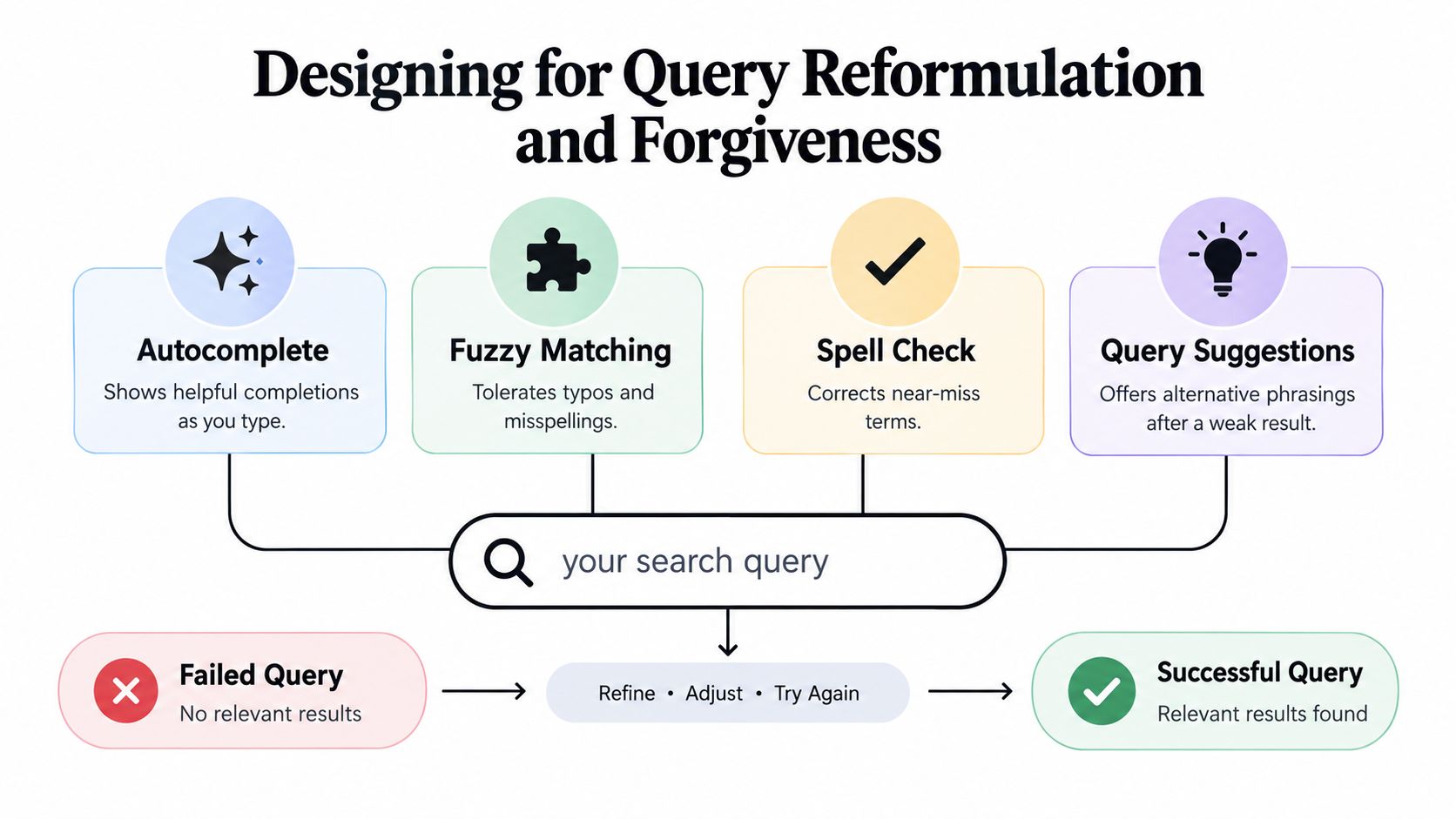
A forgiving search layer should work across several dimensions:
- Synonyms: Map phrases such as “video editing” and “editing videos” when the content supports both.
- Stemming: Connect related word forms so “drawing,” “draw,” and “drawings” don't behave like unrelated terms.
- Typo tolerance: Handle common mistakes without forcing the visitor to discover the correction alone.
- Field weighting: Give titles and headings strong relevance while still indexing meaningful body copy.
- Intent terms: Preserve topic combinations such as “free,” “online,” “download,” “keyword,” or “budgeting” when they distinguish one need from another.
The 2014 Baymard Institute e-commerce search study found that 64% of the 50 highest-grossing U.S. e-commerce sites didn't adequately support product-type searches and required exact internal jargon. The same study found that 34% provided poor or no results when a visitor misspelled even one character. The sample focused on commerce, but the underlying failure appears on article archives too. A WordPress reader shouldn't need to know whether an editor chose “free graphic design software” instead of “free tools like Photoshop.”
Make the index understand the archive
Start by indexing post titles, headings, excerpts, and useful body text. Excluding body content can make an article invisible when the visitor searches for a phrase that appears in the article but not its title. At the same time, don't index administrative pages, duplicate templates, or irrelevant utility content, because noise weakens ranking.
Build a controlled vocabulary from real content. Terms such as free daemon tools, free zip tools, free pro tools download, and pro tools free download can represent very different intentions, so map them deliberately rather than automatically treating every phrase as interchangeable.
A search backend can return a broader result set while displaying a transparent correction. For example, show the original query, then offer “Did you mean…” or “Related searches” instead of replacing what the visitor typed. Users can then decide whether the suggested interpretation is right.
W3C guidance supports this approach by recommending spelling correction, stemming, and synonyms, so users don't have to know a site's exact terminology. Relevance and recovery should be designed together, not added as separate enhancements.
Implementing Helpful Autocomplete and Search Suggestions
Autocomplete works best before the visitor has fully expressed an idea. It's less useful when the query is already long and specific, so don't treat a dropdown as the entire search strategy.
A naturalistic study of 90 Web users found that search-assist features were used for almost 40% of difficult queries. The research also found that autocomplete was most useful during initial formulation, while later reformulation benefited less from it. Successful tasks were more likely to involve query specialization through adding terms, as reported in the study of difficult Web queries.
Use suggestions at the right moment
As the visitor types “free keyword,” suggest meaningful completions such as free keyword tools and free keyword tool, provided those terms reflect actual indexed content. Don't fill the dropdown with unrelated popular searches only because they receive attention. A suggestion should help the visitor add a useful qualifier, not distract them with a generic page title.
For broad queries, encourage precise additions:
- Year: “free keyword tools for current SEO research”
- Audience: “free budgeting tools for beginners”
- Format: “free wireframe tools online”
- Category: “free BI tools for reporting”
- Task: “free visualization tools for dashboards”
Keep the first interaction lightweight. Suggestions should be keyboard navigable, easy to dismiss, and clearly associated with the search field. On mobile, they must not cover the submit control or make the page jump unexpectedly.
Autocomplete can also support voice-driven interfaces, where spoken queries are longer and less predictable than typed phrases. If voice input is part of a commerce project, documentation such as the Magento 2 voice search module can help developers evaluate how voice capture fits into a broader search workflow. The important principle is unchanged: captured language still needs correction, ranking, and clear user control.
After submission, shift from autocomplete to result-page assistance. Offer spelling corrections, related searches, and filters based on the query that failed. Avoid expanding every term without explanation, because opaque rewriting can return results that appear unrelated and makes debugging difficult for both users and editors.
Building Accessible Search Interfaces for Every User
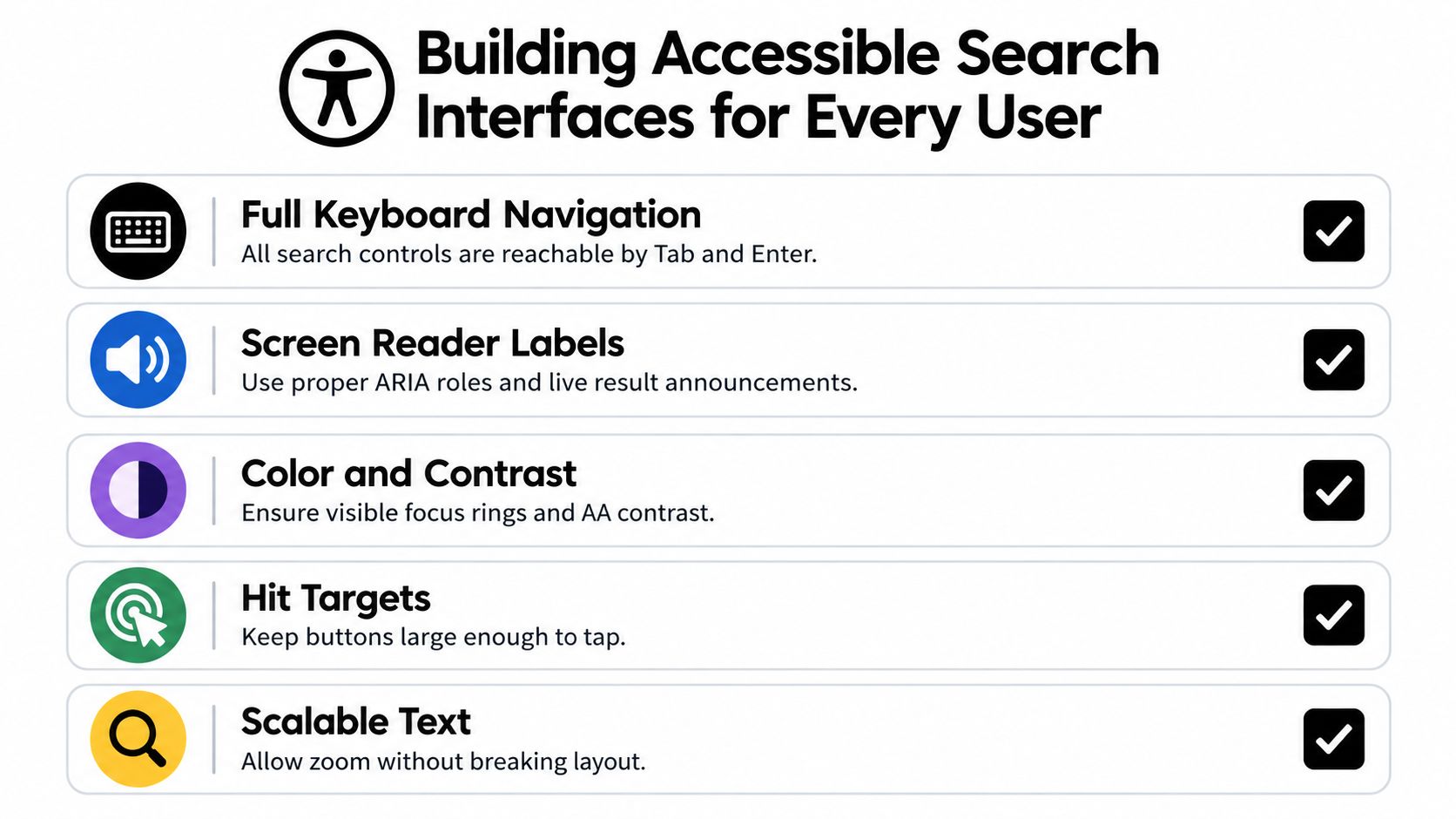
Search accessibility begins before relevance. A visitor using a keyboard, screen reader, magnification, or an alternative input method needs to locate the field, understand its purpose, submit a query, and interpret the response without relying on visual changes.
Give the search field a programmatic label, not just placeholder text. Associate it with a clear submit button, expose the result count as readable text, and identify an empty state in words. When a visitor submits a query, preserve a predictable focus position, ideally returning focus to the results heading or an appropriate status message instead of leaving the keyboard user at an unexplained location.
Make correction guidance understandable
A red outline or color change isn't enough to explain that a query contains a typo. Use text such as “No results for ‘free wirefram tools'. Did you mean ‘free wireframe tools'?” Make the suggestion a real control that can be reached with the keyboard and understood by assistive technology.
W3C's guidance on providing suggestions for correcting input errors specifically connects accessible forms with spelling correction, synonyms, and stemming. That combination matters because a technically labeled search box still fails if the underlying system expects exact internal language.
Semantic HTML can do much of the work. Use a real form, a native input, a visible or programmatically associated label, a named button, and a results region that communicates updates without hijacking focus. Autocomplete should expose its relationship to the input and should not unexpectedly change context while someone is typing.
For WordPress teams reviewing broader page patterns, the best WordPress blog layouts are a useful reminder that visual simplicity and semantic structure can coexist. A minimal interface often improves search accessibility when it keeps controls obvious and reduces decorative elements that compete with status messages.

A component library can speed up implementation, but inspect its keyboard behavior and announcement patterns before adopting it. The ogBlocks accessibility component collection can provide starting points, yet every search interaction still needs testing with actual keyboard navigation and screen-reader output.
Handling Zero Results and Guiding User Recovery
A zero-result page can either end the session or redirect it. Compare these two messages:
| Dead-end response | Recovery-oriented response |
|---|---|
| “Nothing Found.” | “No results for ‘free visualization tools'. Try ‘data visualization', remove a term, or browse visualization articles.” |
| No search field | Original query remains editable |
| No navigation | Links to categories, recent posts, or the homepage |
| No explanation | Spelling and broader-term guidance |
The second version acknowledges what happened and offers several low-effort next steps. Preserve the visitor's query so they can edit it rather than retyping. If the query contains a likely typo, show a correction while keeping the original wording visible.
Choose the right fallback
A broad query may need narrowing. A highly specific query may need broadening. The empty state should respond accordingly.
- For a typo: Offer a visible corrected term.
- For an overly narrow phrase: Suggest removing a qualifier or searching a broader topic.
- For an unfamiliar term: Show related categories or synonyms.
- For a genuine content gap: Link to recent posts, the homepage, or a contact path.
- For an empty submission: Display popular categories or explain what the archive contains.
Don't redirect every failed query to the homepage. That hides the failure and forces the visitor to restart without context. A homepage link is useful as an escape route, but it shouldn't replace specific assistance.
The same principle applies to topics with many possible interpretations. Someone searching for free tools like Photoshop might want image editing, design software, or browser-based alternatives. The empty state can expose those broader concepts without pretending that every result is an exact match.
Using Search Analytics to Refine Content Strategy
Search logs reveal the language visitors use when navigation and page titles haven't done enough. Track the submitted query, result count, clicked result, repeated searches, refinements, and whether the visitor reformulated immediately after clicking.
A large-scale study covering 964,780 Web-search sessions and 1,523,072 queries found that reformulation and assistance represented approximately 45% of all query-reformulation events. It also identifies consecutive queries with substantial term overlap as a practical indicator of low satisfaction with the first query, as documented in the research on patterns of query reformulation during Web searching.
Turn logs into editorial decisions
Create a query-intent dictionary from recurring patterns. Group common misspellings, singular and plural variants, synonyms, and phrases that should lead to the same categories. Then review each group against the actual archive.
Suppose visitors search for free humanizer tools, free tools online, and free writing tools. Those phrases may point to overlapping content, but they may also signal separate needs. Review the clicked results and immediate refinements before adding a synonym. Search analytics should inform taxonomy, not flatten meaningful distinctions.
Flag these situations:
- Repeated zero results: Check whether content exists but isn't indexed.
- Many results with no click: Improve ranking, titles, excerpts, or terminology.
- Repeated similar queries: Add correction guidance or query expansion.
- Frequent category terms: Consider a dedicated archive or landing page.
- Queries with no matching content: Add a topic to the editorial backlog.
For broader WordPress publishing guidance, how to create a WordPress blog provides useful context for structuring content before search has to retrieve it. Good search can't compensate for an archive with unclear subjects, weak headings, or missing supporting pages.
Review logs on a regular schedule, but protect privacy. Store only the search data needed for relevance and editorial decisions, apply suitable retention rules, and avoid collecting unnecessary personal information.
Your Site Search Implementation Checklist
A reliable search system needs a coordinated pass across the index, interface, recovery flow, and measurement. Use this checklist during an audit:
- Inspect the index. Confirm that published posts, headings, excerpts, and meaningful body text are searchable. Exclude duplicate and administrative content.
- Test everyday language. Search for variations such as free map tools, free CRM tools, free BI tools, and free visualization tools. Check whether the results reflect the visitor's wording rather than only editorial jargon.
- Add tolerance. Configure spelling correction, stemming, synonyms, and sensible fuzzy matching. Make corrections visible instead of silently rewriting queries.
- Review suggestions. Autocomplete should help visitors add useful terms. Post-submission assistance should focus on spelling, related phrases, filters, and broader navigation.
- Audit the form. Verify the programmatic label, named submit control, visible focus state, keyboard operation, readable result count, and text-based error messages.
- Rewrite empty states. Preserve the query, explain the failure, suggest alternatives, and provide links to categories, recent posts, or the homepage.
- Instrument behavior. Record query text, result count, clicks, repeated searches, refinements, and successful searches, with privacy-conscious retention.
- Create an improvement queue. Use zero-result and repeated-query patterns to update synonyms, tags, headings, and future articles.
Advanced teams may connect search with semantic retrieval or a retrieval-augmented generation layer. If you're evaluating custom generative AI development services, keep the same standards for transparency, accessibility, source matching, and user control. A more complex backend isn't automatically a better search experience.
Finally, test the public interface on the Read More Info blog with realistic phrases, misspellings, keyboard-only navigation, and mobile layouts. The best implementation is the one visitors can understand immediately and recover through when their first query isn't perfect.
Read More Info offers a straightforward WordPress information experience where readers can discover posts through site search, responsive pages, and RSS updates. Visit Read More Info to explore the publication and see how a lightweight content site can make discovery clearer and more forgiving.