
You know the shape of the problem already. A post from 2021 still collects Search Console impressions and almost no clicks. Beside it sits a newer article that answers the same question in fewer words. Further down the archive, a roundup of free tools your readers still land on names two apps that moved behind a paywall and one that changed its name entirely.
The reflex is to open the editor, bump the date, and press update. That reflex is the thing worth unlearning. A date is a claim about the content beneath it, and when the content hasn't earned the claim, readers and search engines both end up misled.
What works is quieter and more durable. Treat a refresh as an editorial act with a paper trail: a decision about whether the post still deserves to exist, a documented set of substantive changes, and a before-and-after comparison against the post's own numbers. That's the whole method, from triage to measurement, and it starts with four labels.
Table of Contents
- Sort Old Posts Into Update, Merge, Redirect or Keep
- How to Build a Refresh Priority List From Search Console
- How to Refresh Content Without Faking Freshness
- How to Republish, Link and Schedule the Update
- Measure the Update and Run a Quarterly Pilot
Sort Old Posts Into Update, Merge, Redirect or Keep
Start with a list, not an editor window. Pull every post that earned impressions in the past twelve months and give each one a single label before you change a word of any of them. The label decides the work that follows, and it stops an afternoon of refreshing from turning into an afternoon of nudged dates.
Decay supplies the reason. In a study of 100 highly visited articles across five large Swedish content sites, the typical article lost 61% of its search traffic after one year and 68% after three years, with 59% of the articles losing at least half their traffic inside the first year and 20% left with no search traffic at all after three years, as Increv's analysis of content decay records.
Not every topic slides at that rate. Google's November 2011 freshness update affected approximately 35% of searches, concentrated on subjects where people reasonably expect recent information, the same analysis notes. Software, regulations, prices, statistics and health guidance belong on a short review cycle. A piece on how to boil an egg does not.
Triage actions by Search Console signal
| Signal in Search Console | Action | Why It Matters |
|---|---|---|
| Ranked on page one, now slipping | Update the substance and keep the URL | Recovers rankings it already earned |
| High impressions, weak CTR | Rewrite the title, meta description and opening | Cheapest lift available |
| Two posts target the same query | Merge into the stronger URL and redirect the other | Stops the posts competing with each other |
| No clicks, outdated topic, no links | Redirect to the closest live post or delete | Use only when salvage fails |
| Stable traffic on an evergreen topic | Keep and set a review date | Avoids edits that add nothing |
Work down that table in order of effort. Update comes first because the URL already carries whatever history it earned, and a substantive edit inherits that history where a brand new post starts from zero. Correct what has gone stale, replace sources that no longer resolve, add the section the current top results cover and yours doesn't, then tighten the opening so it answers the query in the first paragraph.
Rewrite the headline and snippet when the body is sound but the CTR isn't. That's a copy job, not a research job, and it takes twenty minutes. Merge when two posts chase the same intent: keep the URL with more links and better positions, fold in the useful material from the other, then redirect the weaker one so nothing is thrown away. Redirect or delete belongs at the end of the line, when a post has no clicks, no links, and no topic you intend to keep writing about.
Keeping a post is a real decision
Leaving an old post alone is a verdict, not neglect. A stable subject with steady traffic and a working structure doesn't improve because you rewrote three paragraphs. Mark it with a review date and move on.
Where merges and redirects move URLs around, check the whole chain and not just the first hop. Excellorix keeps a practical technical SEO audit checklist covering redirect chains and canonical tags, which is the part that breaks when a merge maps three old posts onto one new URL. By the end of triage, every post on the list should carry exactly one label.
How to Build a Refresh Priority List From Search Console
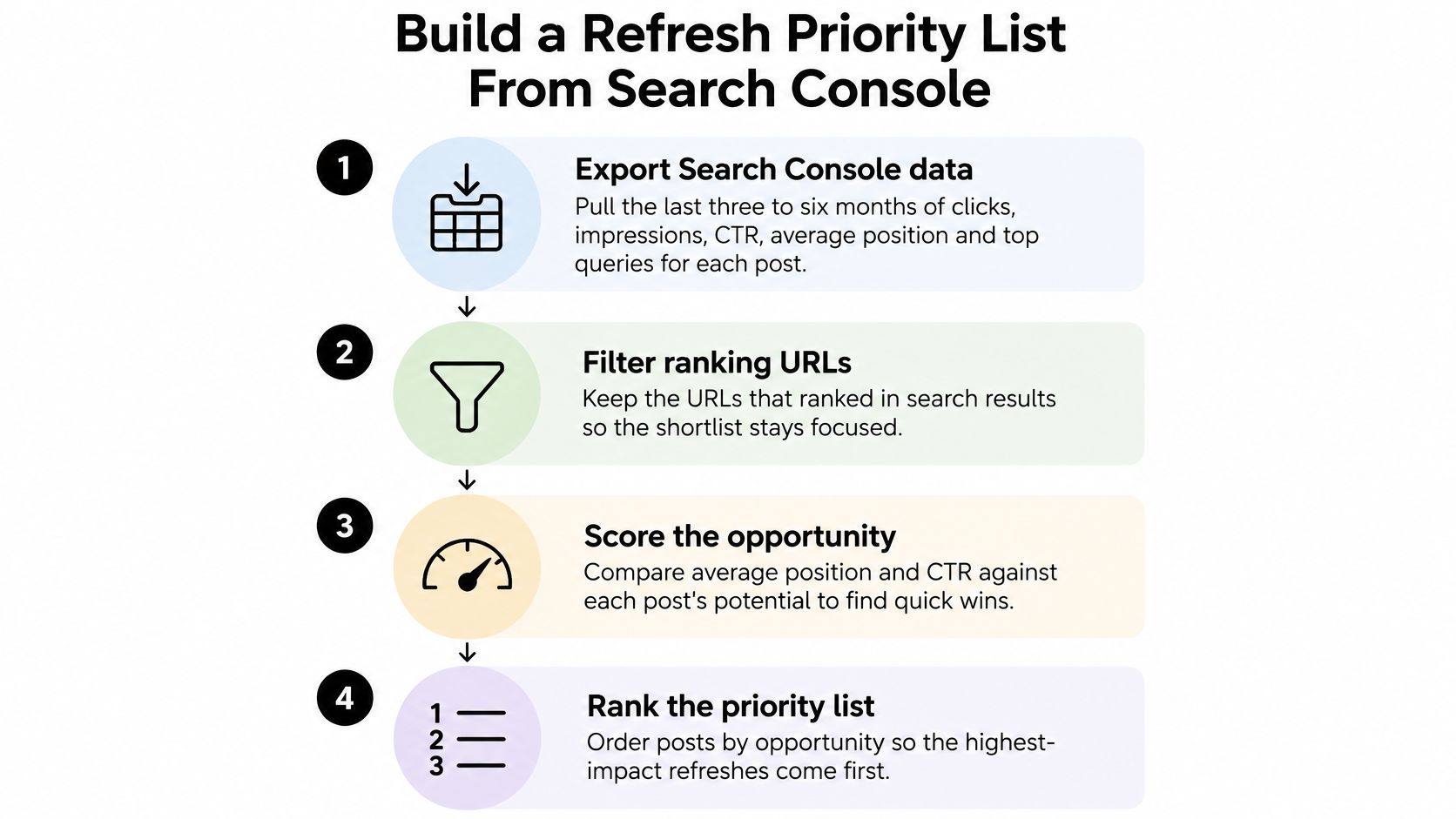
Ranking posts by how much they irritate you isn't a priority list. Ranking them by the gap between impressions and clicks is. The order of work below is the one I'd run on any archive, because each step narrows the field before the next one costs time.
- Export three to six months, one row per URL. Clicks, impressions, CTR, average position and the top queries. Three months shows a trend; six absorbs seasonality so a normal summer dip doesn't read as a collapse.
- Keep the URLs that used to hold page one and no longer do. These pages already proved they can rank. Recovering a lost position costs less than winning a new one from nothing.
- Flag high impressions against weak CTR. A post sitting fourth with a 1% CTR has a snippet problem, and a snippet problem is cheap.
- Flag clicks that fell three months running. A slope is a signal. One bad week is weather.
- Read the queries before you read the post. The query list says what people want now. If a post about free OCR tools is collecting queries about scanning documents on a phone, that's the section to add.
- Score by potential gain, never by percentage alone. Most shortlists go wrong here.
Here's the arithmetic on that last step. Say one post turns 12,000 monthly impressions at a 0.8% CTR and another turns 300 impressions at 6%. The first is the better bet even though its CTR looks worse, because lifting it from 0.8% to 2% adds roughly 144 clicks a month, while doubling the second post's CTR adds about 18. Rank by the clicks you can win, not by the ratio that looks most embarrassing.
Google's own guidance on keeping content current widens the audit beyond the numbers. It points at current search intent, competing result formats, factual accuracy, internal links, metadata, headings, structured data, accessibility and broken external references, treats deletion as a last resort, and asks you to request recrawling after publishing and compare against the baseline weeks later rather than on the same afternoon.
End the exercise with ten posts and a spreadsheet. Each row holds the URL, the label, the saved baseline numbers and the planned edit. Ten is a quarter's work for one editor at a few hours a week. Thirty is a fantasy that stalls in week three, and a stalled refresh program is worse than none because half the archive now looks inconsistent.
Rule of thumb: if you can't name the query the post should win and the number that will prove it worked, it isn't ready for the list yet.
How to Refresh Content Without Faking Freshness
The most common refresh in the wild is a date change plus a spellcheck. It's also the one Google's guidance on creating helpful content argues against: changing dates when the content hasn't substantially changed doesn't make a page fresher, and adding or removing older content only to look active won't improve rankings.
The defensible habit is almost the opposite. Keep the original publication date visible, add a separate last reviewed or last substantively updated line, and write down what changed.
A refresh session is mostly desk work. A text editor, a spreadsheet of URLs, and the primary sources open in adjacent tabs.
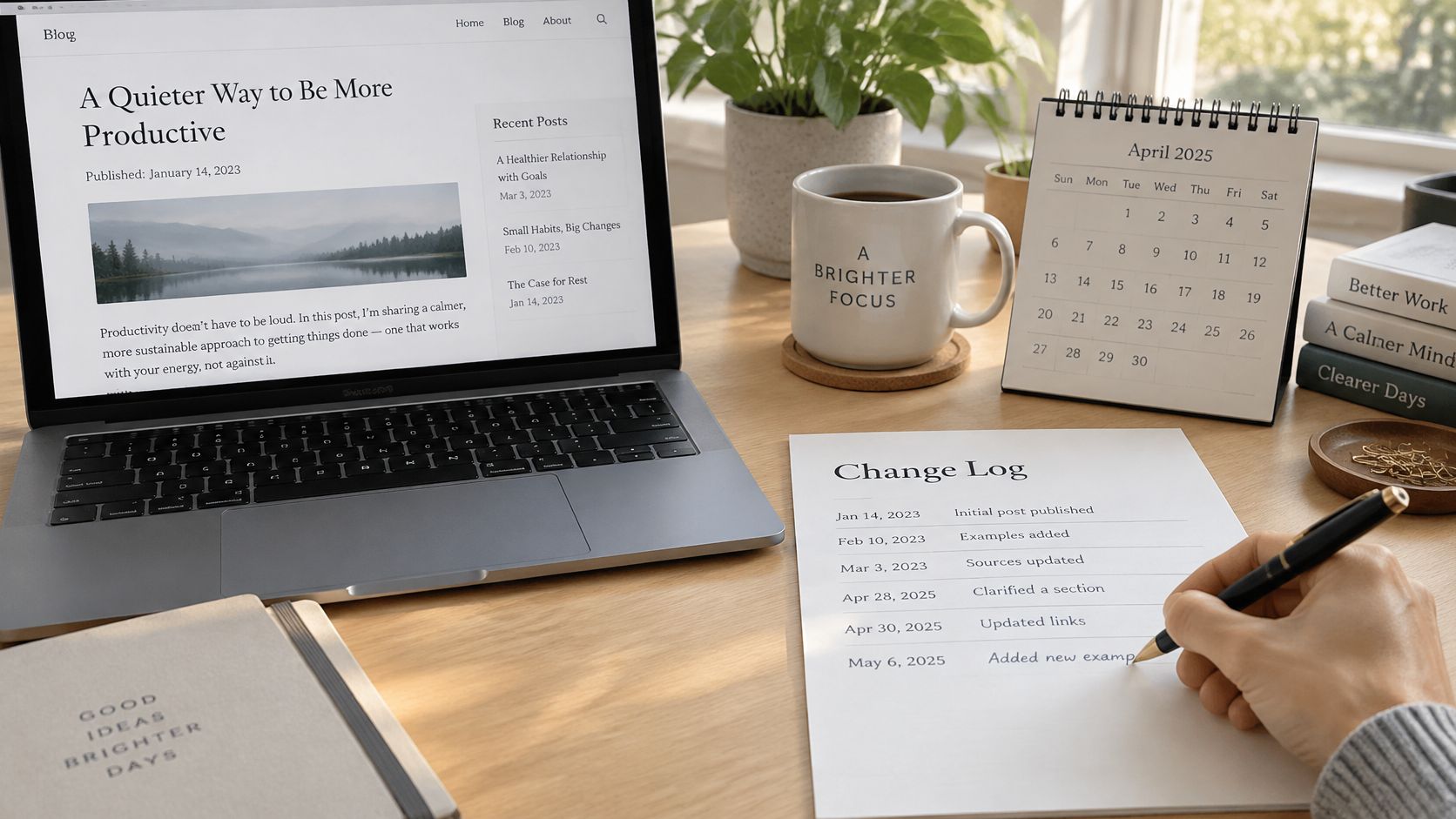
Classify the edit before you touch the date
Edit types and when to change the visible date
| Edit Type | Typical Example | Change Visible Date? |
|---|---|---|
| Factual correction | Replace an outdated statistic or a changed menu path | Yes, after the change |
| Scope expansion | Add a section for a question readers now ask | Yes, after the change |
| Usability improvement | Split a dense block, add a contents list | No, log it only |
| Cosmetic change | Swap a header image or fix typos | No |
The rule that falls out of that table is short. Corrections and scope changes earn a new visible date. Splitting a wall of text or swapping a header image does not, and logging it as cosmetic is enough.
A worked example on a free tools roundup
Old roundups are where false freshness hides best, because the broad claims stay true while the specifics rot. A post promising free tools online usually covers a dozen clusters: free office tools, free OCR tools, free AI tools online, free editing tools for videos, free ZIP tools, free keyword tools, free budgeting tools, free wireframe tools, free BI tools, free visualization tools, free writing tools, free drawing tools, free CRM tools, free map tools, plus commercial-query impostors such as free Pro Tools download, pro tools free download and free DAEMON Tools.
Take three corrections from that kind of page. For free office tools, state what the suite contains rather than calling it "full featured": LibreOffice ships six applications (Writer, Calc, Impress, Draw, Base and Math), saves to OpenDocument Format natively, opens and saves DOC, DOCX, XLS, XLSX, PPT and PPTX, and exports Writer documents to PDF and EPUB, as the LibreOffice project describes.
For free OCR tools, the correction is a mechanism rather than praise. Tesseract's recognition depends on the language training data installed alongside it, and its language training data repository exists to supply that coverage. A post claiming free OCR works in any language out of the box is wrong in a way readers only discover after the download.
For free tools for video editing, the detail most roundups skip is a codec limit in the free edition of DaVinci Resolve, which independent documentation reports as no H.264 or H.265 decoding and encoding in the tested configuration even though the MP4 container itself is supported, as the Arch Linux wiki entry on DaVinci Resolve records. A reader importing a phone MP4 hits a codec error, not a container error, and one sentence about it saves them an hour.
The free tools like Photoshop entry is the one I'd mark as needing verification rather than rewrite from memory. Naming GIMP as a free, open-source image editor is fair. Claiming specific compatibility or file-format thresholds without an official source is how a refresh introduces a new error while fixing an old one. The free humanizer tools entry deserves the same suspicion, because output quality claims can't be checked against a primary source.
Three habits keep this honest:
- Verify every statistic against its original source. If the source has changed or vanished, cut the number rather than re-pointing it at a blog that cited it.
- Replace one weak source at a time. Swapping five makes it impossible to tell which change moved the needle when numbers shift.
- Name the software version. A WordPress instruction written for a particular admin screen expires the moment that screen moves.
Less frequent but more documented beats routine re-dating, because the log is the only part a reader can actually audit.
Read More Information aims to keep its articles accurate and updates them when software or features change. A visible log is how that intent becomes checkable rather than just stated.
How to Republish, Link and Schedule the Update
Publishing is the step people rush, and it's where a good edit loses its value without anyone noticing. Run these in order.
- Keep the URL. The slug is the one asset an old post owns outright. If it has to change, set a permanent redirect from the old address before anything else goes live.
- Link in from three to five newer posts. Pick posts on related subtopics and vary the anchor text instead of repeating one phrase. Internal links are how a refreshed page gets recrawled and how readers find it again.
- Link out to your narrower guides. If the roundup now covers free keyword tools in one paragraph and you have a full guide to the best free keyword tool for small sites, point at it. A short section plus a link beats a padded section.
- Check the title tag, meta description and first heading against the target query. If the query shifted, the title should say what the post now answers, not what it answered in 2022.
- Verify structured data and internal links. A link pointing at a redirect still works for readers and wastes a crawl for you. Fix them while the post is open.
- Schedule the publish for a fixed weekday. WordPress makes this trivial, and a fixed day gives every update in the quarter the same clean before-and-after window. Read More Information publishes how-to guides on WordPress themes, scheduled posts, blog layouts and site setup, and the scheduling screen is where that advice meets this workflow.
- Update the XML sitemap and request indexing. Then leave the post alone and let the window fill.
The slip that wastes the most work is linking the refreshed post to another old post that also needs updating. You've just handed readers and crawlers a stale reference and made two pages look equally neglected. Either refresh the second post in the same pass or leave it unlinked until you do.
Practical rule: one update, one publish date, one entry in the log. Batch publishing hides the cause when numbers move.
Measure the Update and Run a Quarterly Pilot
The update is live. The only question worth asking now is whether it worked, and the answer comes from a comparison you set up before you pressed publish.
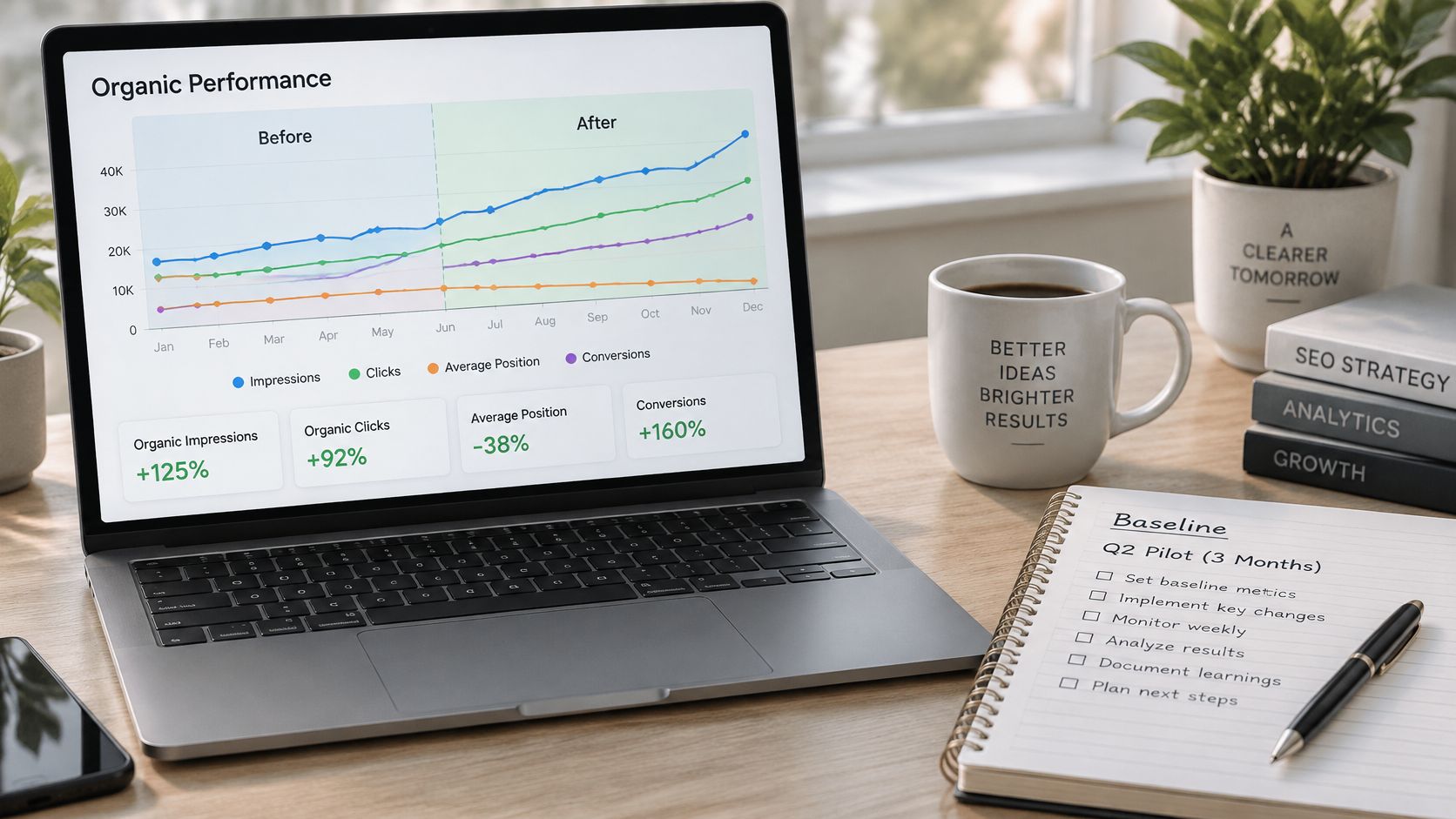
Save a fixed pre-update window: the 28 or 90 days ending on the publish date, with organic impressions, clicks, average position, engaged visits and conversions. Then compare the same number of days after, measured from the same point. Pageviews alone will mislead you, because a bounce from a confusing intro counts exactly like a satisfied read.
Established pages tend to respond because they already carry indexing history, backlinks and accumulated user signals. HubSpot's historical-optimization program, which updated and republished older posts, produced an average 106% increase in monthly organic search views for the posts it optimized, and 76% of its monthly blog views and 92% of its monthly leads came from older posts, according to Milan Novotny's collection of content decay statistics. Treat that as the ceiling of a well-run program, not a promise attached to a single edit.
Diagnostic patterns after a refresh
| Search Console pattern | Likely cause | Next move |
|---|---|---|
| Impressions up, average position flat | Title or snippet win | Keep the edit and watch CTR |
| Clicks up, average position down | CTR gain from a clearer snippet | Keep the change and log the result |
| No movement after six to eight weeks | Search intent still mismatched | Revisit the query and rewrite the sections that miss it |
| Clicks and position both falling after the wait period | Edit weakened relevance or removed a ranking section | Compare with the baseline and restore the prior version if needed |
Give it six to eight weeks before you judge, and never reverse an update in its first week. Early dips happen while a page is re-evaluated, and a panicked rollback destroys the only evidence you'd have gotten. When the window closes, write the result into the change log so the next refresh starts from real numbers rather than memory.
Refreshing the same ten posts every quarter is a loop, and Magic Genie's guide to building Kaizen improvement loops is a useful frame for making each pass smaller and better documented than the last. The loop only works if the record survives the quarter, which is why the log matters more than the dashboard.

This video is hosted by YouTube (Google). Pressing play loads the video from YouTube, which may set cookies and share data with Google.
Then decide scope. Run a quarterly pilot on the ten highest-priority posts rather than a site-wide rewrite, and extend it only when the gains beat the baseline and the edits were genuinely substantive. A single editor can run that pilot in a few hours a week, which is the point: it survives a busy month.
The first action is the export. Open Search Console today, pull the last six months, and sort every old post into one of the four labels before you edit a single sentence.
Read More Info publishes practical guides on WordPress themes, scheduled posts, blog layouts and site setup, and it aims to keep those articles accurate by updating them when software or features change. If you're planning your own refresh cycle, Read More Info is where those guides live, with an RSS feed you can follow so updated and new posts reach you without checking back.