
What makes a blog post more than a page of text on a website? It is a dated, individually published entry on a blog, usually shown newest first, with its own permanent web address, a named author and a timestamp.
Those details act like a return address on an envelope. The URL lets someone find the same piece years later, the date shows when it was written, and the byline tells them who stands behind it. A headline, photo or share button may decorate the package, but the address, date and author are what make it recognisable, quotable and trustworthy.
Table of Contents
- What a Blog Post Is in Plain Terms
- The Parts Every Blog Post Includes
- What Blog Posts Are Used For
- How Blog Posts Are Ordered, Shared and Found
- What Makes a Blog Post Trustworthy and Usable
- When a Blog Post Fits and How It Differs
What a Blog Post Is in Plain Terms
A blog post is a dated, individually published entry on a blog, typically shown newest first and often open to comments and syndication. Picture a dated page in a journal. Tear it out, hand it to a friend, and it still reads as a complete thought, because the date and the signature travel with it.
The format has a short, traceable history. Justin Hall started Links.net in 1994, which New York Magazine's account of blogging's early years treats as one of the first personal blogs. In December 1997 Jorn Barger coined weblog to describe logging activity on the web, and in April 1999 programmer Peter Merholz shortened it to blog, a term that spread quickly.
Early posts sat closer to link-and-commentary entries than to newspaper articles. By 1999, easier publishing tools let people who weren't programmers publish their own, which is how a personal habit turned into a mainstream web format covering tutorials, reviews, news analysis and business writing.
Three features separate a post from a stray web page. A timestamp records when it was published and, often, when it was last revised. A permanent URL gives it an address you can paste into an email or a forum years later. An author attribution tells you whose claim you're reading. Spot those three on a page and you're almost certainly looking at a blog post.
To see how they sit together, Zemith's sample blog article presents one titled entry with a date, an author line and a single continuous body, which is the shape to hold in your head before you write your own.
Rule of thumb: if the URL, the date and the byline wouldn't survive being pasted into a chat message, the page isn't a post yet, whatever it looks like.
The Parts Every Blog Post Includes
Every post you've read was assembled from the same small inventory of parts. Once you can name each one, you can audit a page in about a minute.
| Part | What it does | Example |
|---|---|---|
| Headline | Names the post and earns the click | How to Water a Snake Plant Without Rot |
| Permanent URL | Gives the post a stable address that can be linked and shared | /water-snake-plant-without-rot/ |
| Byline and date | Shows who wrote it and when it was published or updated | By Maya Ortiz, updated 3 March 2026 |
| Body | Carries the main content, usually with subheadings and short paragraphs | Intro, steps, tips and closing section |
| Featured image | Sets the visual tone and appears in previews | Photo of the plant on a windowsill |
| Excerpt or summary | Shows a short description in feeds and search results | One-sentence summary of the post |
| Categories and tags | Groups posts into archives and topic pages | Houseplants, Care Guides |
| Comments area | Lets readers respond and discuss | Reader questions and replies |
The parts divide the labour. The headline and the URL make the introductions: one persuades a person, the other gives machines and link-sharers a stable handle. The date and byline answer the two questions readers ask before they invest ten minutes. The body carries the argument, and the excerpt is the compressed version that travels into feed readers and search results. Categories and tags file the post among its siblings so someone who liked it can find the rest.
Which parts are essential and which can wait
Load-bearing parts, the ones a post can't function without, are the headline, body, permanent URL, date and named author. Remove any of them and the entry stops being a post and becomes a stray page.
Optional parts you can add later without breaking anything:
- Featured image: worth adding for tone and previews, not required for meaning.
- Excerpt: useful when you want a specific summary in feeds instead of the first paragraph.
- Categories and tags: helpful once you have enough posts that an archive needs structure.
- Comments: good for discussion, and many sites hold them for review before they appear, which is a normal editorial choice rather than a closed door.
Length is a benchmark rather than a rule. Orbit Media's survey of 808 content marketers, reported by Superblog's blogging statistics, put the average 2025 post at 1,333 words. That figure describes the web, not your question. If you want the trade-offs spelled out, our guide to how long a blog post should be works through them.
Most writers draft in free writing tools they already own and check demand with a free keyword tool before committing to a headline, which is cheaper than rewriting after publication.
What Blog Posts Are Used For
Five post types cover most of what gets published, and each one answers a different question from the reader. The workspace below is the ordinary scene behind that work: a draft open, notes beside it, nothing exotic.
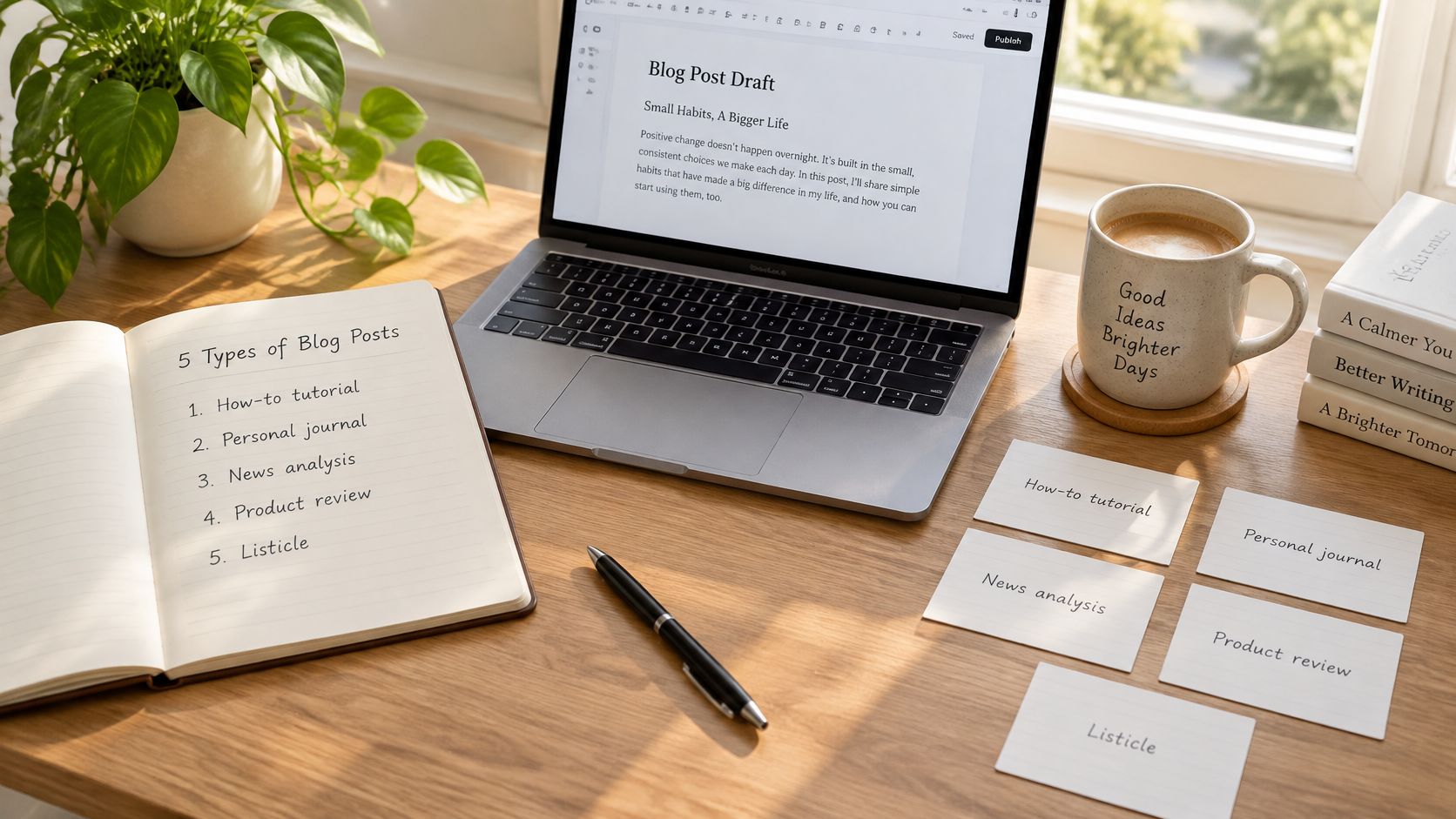
| Post type | Main purpose | Reader question it answers |
|---|---|---|
| How-to tutorial | Teach a specific task step by step | How do I do this? |
| Personal journal entry | Document an experience and share it | What happened, and what did the writer learn? |
| News analysis | Explain an event and why it matters | What happened and what does it mean? |
| Product or service review | Compare options and give a verdict | Is this worth choosing? |
| Company update | Share news and build trust with customers | What is new with this business? |
Take one post from first click to final line. A gardener publishes a guide called How to Water a Snake Plant Without Rot. The headline promises a result, not a topic. The body runs numbered steps under subheadings such as watering frequency and drainage. The permanent URL is /water-snake-plant-without-rot/, so the link still works when someone shares it in a forum next year. The byline shows an update date of 3 March 2026, which tells a reader the advice has been maintained rather than abandoned.
Swap the subject and the parts don't change. A tutorial answers how, so its body is a sequence of steps. A review answers whether, so its body is a comparison and a verdict. The container stays the same; the question inside it decides the shape.
A tutorial answers how. A review answers whether. The parts don't change, the question does.
Reach isn't hypothetical for this format. Pew Research Center reported in 2006 that about 12 million American adults, 8% of adult internet users, kept a blog, while roughly 57 million adults, 39% of the online population, read them, and 76% of bloggers named documenting personal experiences and sharing them with others as a reason they blogged (Pew Research Center).
Business use is just as ordinary. HubSpot's State of Blogging Report found 65% of surveyed marketers said their companies maintained blogs in 2025, and 22% of businesses with blogs published daily (HubSpot).
Where free tool roundups fit
Roundups are their own post type, and they live or die on specifics. Most free tools roundups earn their traffic by matching a category to a real limit, so the reader learns what the free edition refuses to do before they install anything.
- Free office tools that replace a paid suite: LibreOffice ships six applications (Writer, Calc, Impress, Draw, Base, Math), saves in OpenDocument Format, and exports to PDF, HTML, XHTML, XML and EPUB, which is a claim a reader can verify in ten minutes.
- Free pro tools download, and what the free edition allows: Pro Tools Intro caps a session at eight audio tracks, eight instrument tracks, eight MIDI tracks, four auxiliary tracks and one master track, with 36 plug-ins, and saves in the standard .ptx format. A post that promises a pro tools free download without those limits is selling the reader short.
- Free editing tools for videos and free tools for video editing: trimming, captioning and screen recording, grouped by the job rather than the brand.
- Free zip tools and free daemon tools: archive handling and virtual disc mounting, which sound obscure until a reader has a file they can't open.
- Free tools like Photoshop: browser editors for cropping, resizing and background removal, where the main constraint is export resolution.
- Free keyword tools, free OCR tools and free AI tools online: research, scanning and drafting aids that only work when paired with the writer's judgment.
- Free budgeting tools, free CRM tools, free map tools, free wireframe tools, free bi tools, free visualization tools, free drawing tools and free tools online: task-specific categories where the post's value is matching one tool to one job.
If you'd rather watch the process than read it, this walkthrough covers the drafting steps from outline to publish.

This video is hosted by YouTube (Google). Pressing play loads the video from YouTube, which may set cookies and share data with Google.
How Blog Posts Are Ordered, Shared and Found
Publication follows a sequence, and understanding it explains how one entry can appear in five places at once. This is what happens after you press publish.
- The post gets an address and a clock. The site assigns a permanent URL and records a publication time, both stored with the entry rather than added to the page by hand.
- The blog index puts it on top. Entries display newest first, so a returning reader sees what changed since their last visit without scanning the whole site.
- The feed copies it. RSS and Atom output model the same entry with a title, a link, a short description and an author, which is why a post is a syndication object and not just a rendered page.
- Feed readers and aggregators fetch it. Software checks the feed on its own schedule and shows subscribers whatever is new, with no visit to your site required.
- Search engines read the signals. Google's guidance on Article structured data recommends fields such as author, datePublished and dateModified so search systems can interpret the headline, the writer and the dates correctly.
- Readers arrive from three doors. Search, a feed, or a shared link, all landing on the same permanent address.
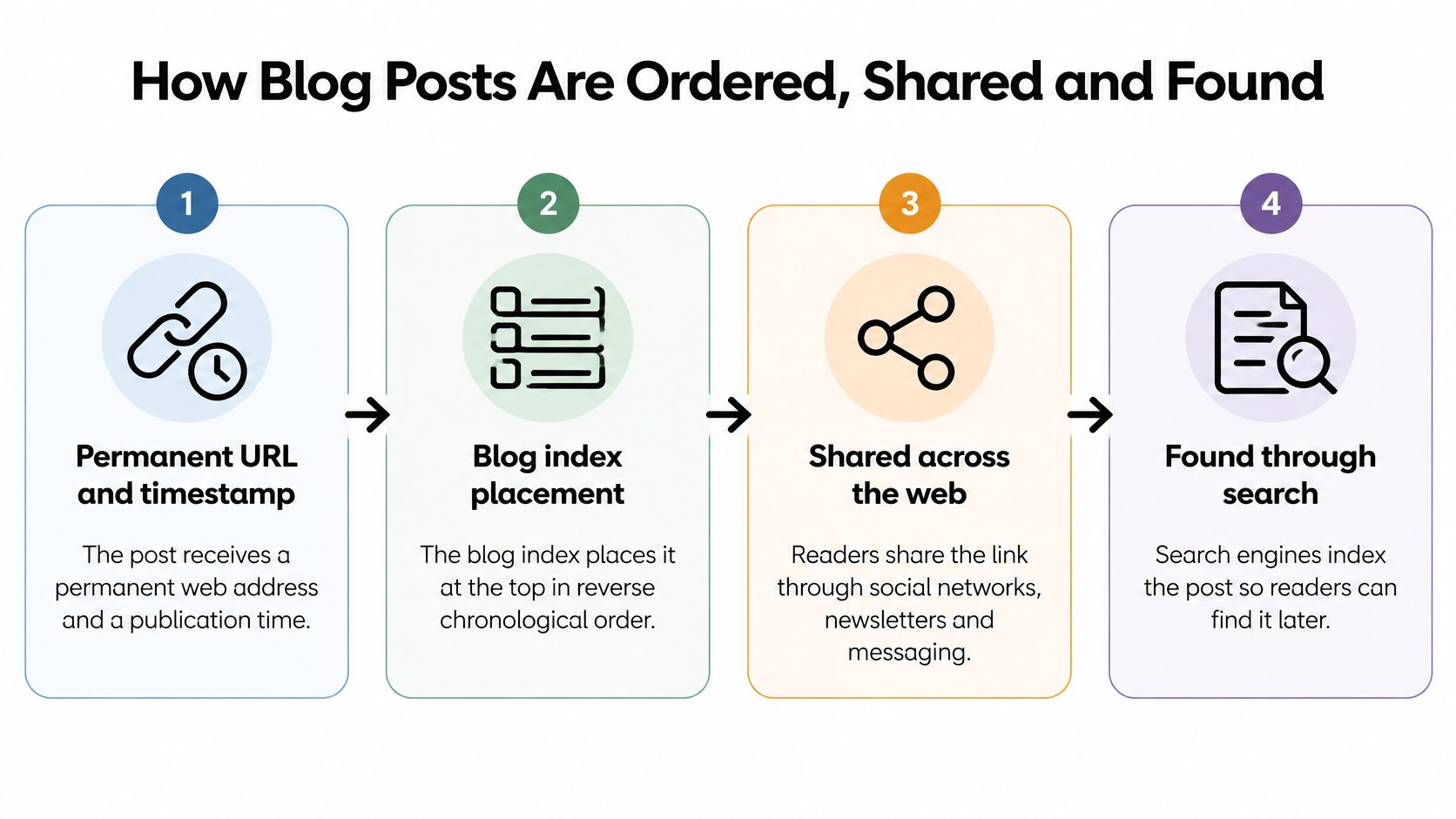
The two formats are the point. One post produces a human-facing HTML page for reading and a machine-readable feed entry for software, and both describe the same content with the same author and dates. A missing byline or an undated entry breaks the second path, because aggregators and search systems have nothing reliable to work with.
If you want the mechanics of the second path, our explainer on what an RSS feed is walks through the file a subscriber reads. Read More Info publishes articles on RSS and feed readers, site search, responsive design and web basics, because those are the parts readers meet first and understand last.
Discussion works the same way. A site search box finds posts by keyword, and a comment feed lets someone follow replies under a post without reopening the page. The post stays the hub for both the reading and the response.
What Makes a Blog Post Trustworthy and Usable
A trustworthy post works like a labelled parcel. Its permanent address gets it to the right destination, while its author, dates, sources and revision record tell a reader who prepared it, when it was assembled and whether it has been checked since. Before judging the writing style, inspect those labels one at a time.
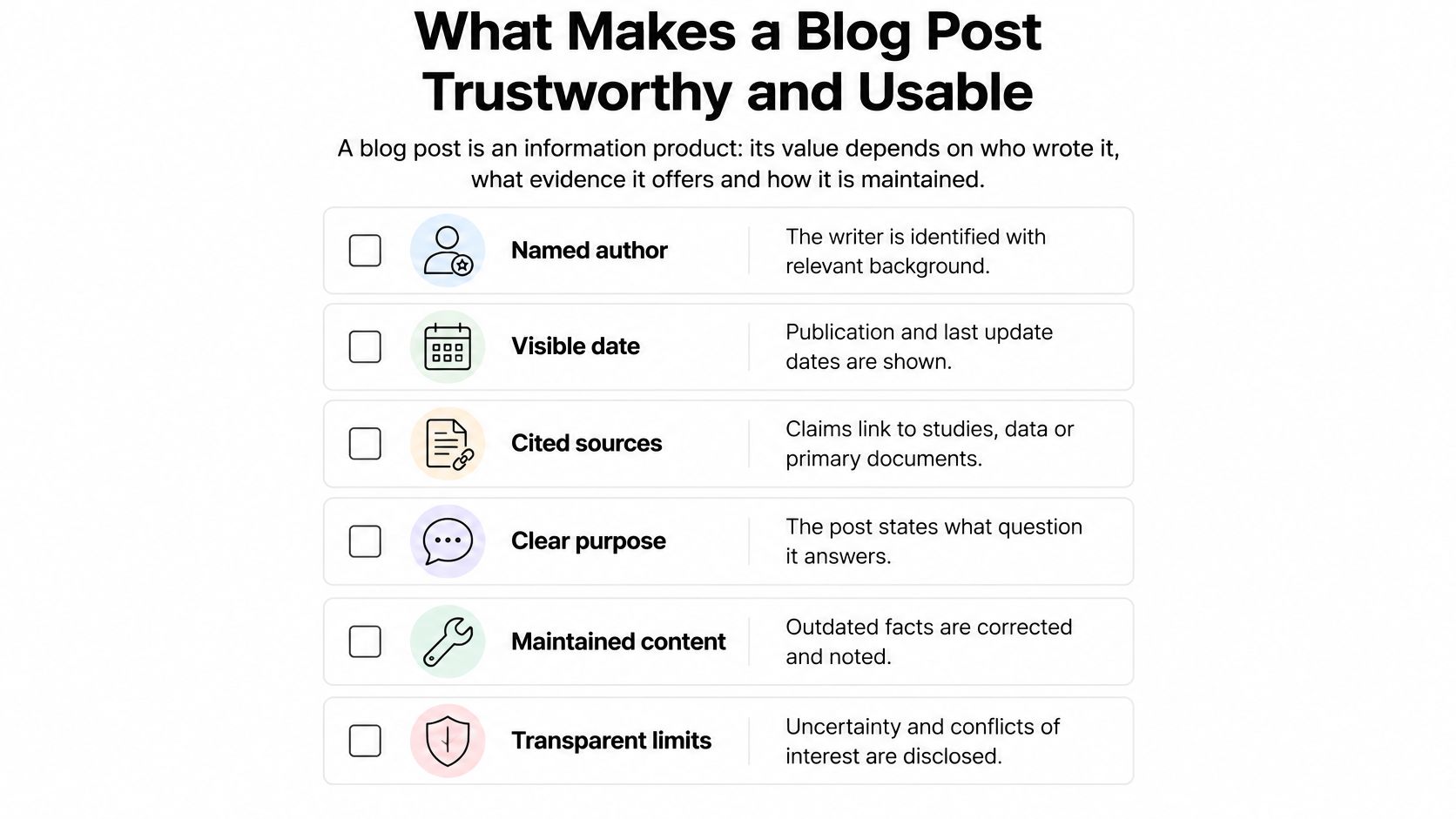
- Named author: a visible byline and a line of relevant background. “Admin” identifies a role, not a person a reader can assess.
- Visible dates: the publication and last-update dates should appear on the page, revealing whether the advice predates a software or feature change.
- Cited sources: key claims should link to original research, official documentation or the primary document being discussed.
- Stated purpose: an early sentence should name the question the post answers.
- Maintained content: outdated details should be corrected, with a note explaining what changed.
- Disclosed limits: the post should acknowledge uncertainty, sponsorship and any use of AI tools in drafting or summarising.
Readers pay attention to that last signal. The 2025 Reuters Institute Digital News Report found that people expect AI to make content cheaper and more up to date, while also expecting it to be less transparent, accurate and trustworthy; trust received a net negative assessment of 18 points (Reuters Institute). A publisher using AI assistance should therefore explain its role and place a named person behind the final judgment.
Usability checks that cost nothing
Trust gets a reader to the page. Usability helps them finish it.
- One topic per post: if the headline needs an “and”, the material probably belongs in two posts.
- A logical heading order: sections should nest properly through correct markup, which our guide to semantic HTML explains.
- Short paragraphs: three or four sentences broken by useful headings prevent a phone screen from becoming a wall of text.
- Alt text on informative images: describe what the image shows rather than repeating its caption.
A post rewritten with free humanizer tools still needs a named editor. Rewriting a machine draft can improve phrasing, while firsthand checking, source judgment and accountability require a person.
RSS and responsive layouts can carry a trustworthy post farther and keep it readable on different screens. Neither creates credibility by itself. Read More Information aims to keep its articles accurate and to update them when software or features change; that upkeep gives the visible dates continued meaning.
When a Blog Post Fits and How It Differs
A blog post is a time-stamped unit inside a frequently updated site, displayed newest first. A static page is not organised by date at all. That single difference explains most of the confusion beginners hit when they're deciding where to put something.
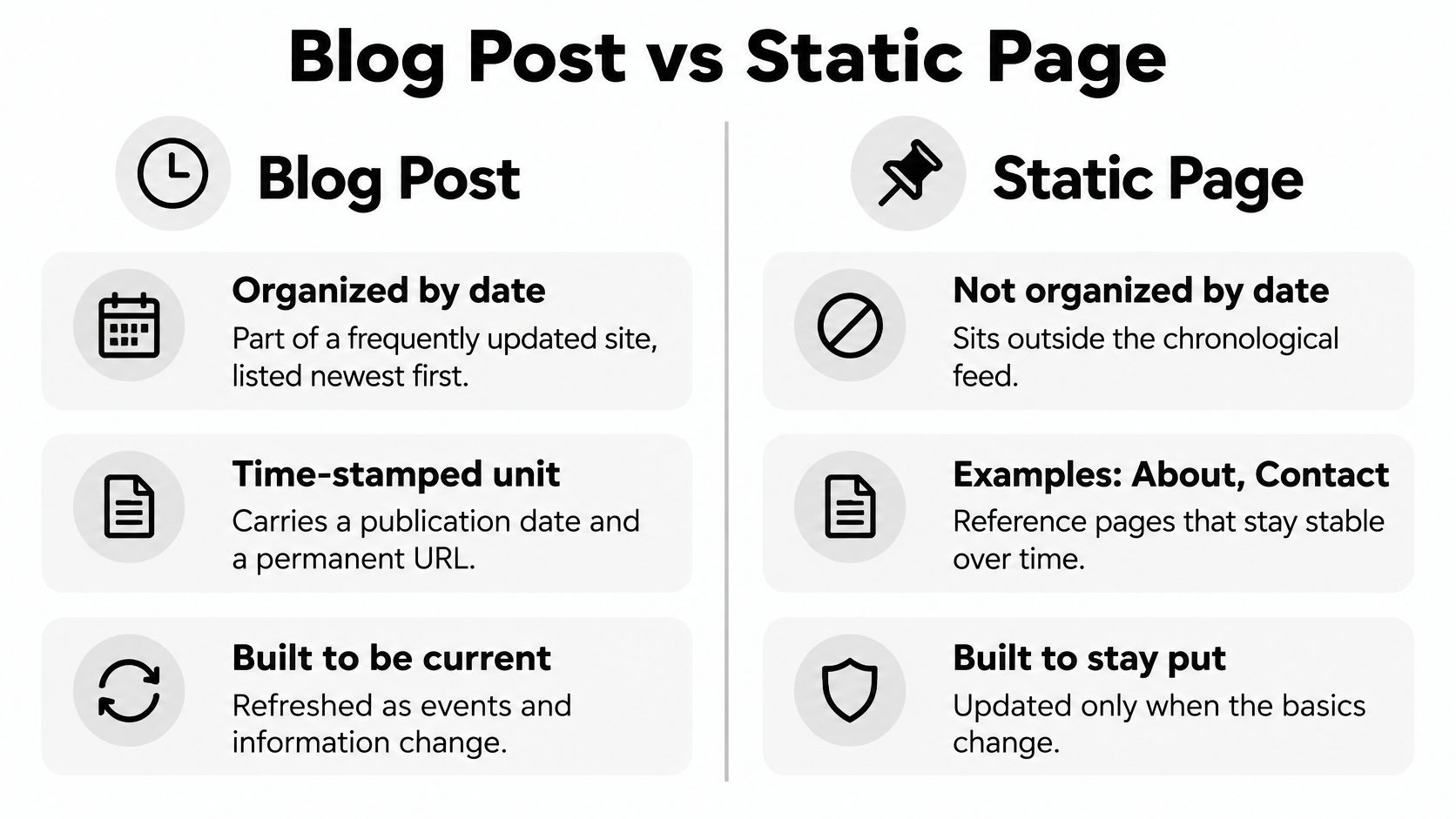
| Feature | Blog post | Static web page | News article | Social media post |
|---|---|---|---|---|
| Ordering | Newest first in the blog index | Not organized by date | Dated within a news section | Scrolls by time in a feed |
| Lifespan | Stays linkable and searchable for years | Changes rarely | Archived by the publisher | Often short-lived in the feed |
| Typical author | Individual or brand writer | Site owner or company | Staff journalist or editor | Individual or account holder |
| Main purpose | Explain, share or document over time | Describe a fixed topic such as About or Contact | Report recent events | Quick update or reaction |
| Updating | Edited with a visible update date | Edited without a date trail | Corrections noted | Usually not edited |
Three differences that cause confusion
Address versus scroll. A post has its own URL that still resolves in three years. A social update sits in a feed that pushes it out of sight by dinner, so anything you'd want to link to belongs on the blog.
Voice versus authority. Posts usually carry a person or a brand behind them, which is why a byline matters. Plenty of news organisations also publish blog-style analysis, so voice alone doesn't settle what you're reading. Structure and dating do.
Editable versus final. A post can be revised, and a visible update date is the honest signal that it was. A page that never shows a revision date asks you to assume nothing changed.
A practical test: can you name the question this post answers, and would you still send the link to a friend after the update date?
The decision rule is short. Choose a post when the message is dated, benefits from revision, should be linkable on its own and is meant to be found through search or feeds. Choose a static page for fixed information such as About, Contact or shipping terms. Choose a social update for a quick reaction that doesn't deserve a permanent address.
Three questions before you write
- Will this need an update in six months? If yes, it's a post, and the update date becomes part of its value.
- Does a reader need to find this by searching? Then it needs a headline that matches the question and a URL that survives being shared.
- Is there one clear topic a single URL can answer? If the answer sprawls, split it.
Publication time belongs to the content model here, which is how research on blog readers describes the format: frequently modified web pages holding dated entries in reverse chronological sequence (Phys.org's report on the study). That's a structural fact, not a style preference.
For a first step, draft one post with a headline, a permanent URL, a visible date, a named author and clear subheadings. Then read it back against the trust checklist above and fix whatever you can't defend. Read More Info's guides on WordPress themes, scheduled posts, blog layouts and site setup exist because these choices arrive on day one, not at scale.
If you'd rather learn this by publishing than by reading about it, Read More Info is a WordPress site built for that first step, with posts, archives and a working feed you can subscribe to and compare against everything above. Our how-to guides on themes, scheduled posts, layouts and site setup take the next decisions one at a time. Visit Read More Info and start with the post you'd want to find when you search the question at midnight.